How to build your own Web Search Engine
Πως να φτιάξετε τη δική σας Μηχανή Αναζήτησης Διαδικτύου
IntroductionΕισαγωγή
In this article, we will show how to implement a Web Search Engine in Python using the Flask micro web framework and the open source search engine Typesense. This will be a basic skeleton design. You can use it to develop further your own search engine which you can deploy it on a server and have access to it through a web interface. You can add whatever features you want.
Σε αυτό το άρθρο, θα δείξουμε πώς να υλοποιήσετε μια μηχανή αναζήτησης ιστού στην Python, χρησιμοποιώντας τη μικρo-πλατφόρμα Flask και την ανοιχτού κώδικα μηχανή αναζήτησης Typesense. Αυτό θα είναι ένα βασικό σχέδιο σκελετός. Μπορείτε να το χρησιμοποιήσετε για να αναπτύξετε περαιτέρω τη δική σας μηχανή αναζήτησης, την οποία μπορείτε να εγκαταστήσετε σε έναν διακομιστή και να έχετε πρόσβαση σε αυτήν μέσω μιας διεπαφής ιστού (web interface). Μπορείτε να προσθέσετε όποιες λειτουργίες επιθυμείτε.
Backend codeΚώδικας πίσω μέρους
requirements.txt
flask
tqdm
trafilatura
typesense
First of all, let's see what python packages we are going to make use of:
Πρώτα από όλα, ας δούμε τι πακέτα Python πρόκειται να χρησιμοποιήσουμε:
- Flask is a lightweight web application framework.
- tqdm is a progress bar for Python.
- trafilatura is a Python package and command-line tool designed to gather text on the Web. It includes discovery, extraction and text processing components.
- typesense is a Python client for the Typesense API.
- Flask είναι μια ελαφριά πλατφόρμα για διαδικτυακές εφαρμογές.
- tqdm είναι μια μπάρα προόδου για Python.
- trafilatura είναι ένα πακέτο Python και εργαλείο γραμμής εντολών σχεδιασμένο για τη συλλογή κειμένου από τον Παγκόσμιο Ιστό. Περιλαμβάνει στοιχεία ανακάλυψης, εξαγωγής και επεξεργασίας κειμένου.
- typesense είναι ένα πακετό Python για πρόσβαση στο Typesense API.
We can install all of them inside a Python virtual environment like this:
Μπορούμε να τα εγκαταστήσουμε όλα μέσα σε ένα εικονικό περιβάλλον Python ως εξής:
$ python -m venv env
$ source env/bin/activate
(env) $ pip install -r requirements.txt
crawler.py
Here is our crawler.py, which contain all the functionality related to crawling and ripping a website. For this purpose, we make use of the trafilatura package. We store the extracted site data as a JSONL file.
Εδω είναι το crawler.py μας, το οποίο περιέχει όλη τη λειτουργικότητα που σχετίζεται με τη σάρωση και εξαγωγή ενός ιστότοπου. Για τον σκοπό αυτό, χρησιμοποιούμε το πακέτο trafilatura. Αποθηκεύουμε τα δεδομένα που εξάγαμε από τον ιστότοπο σε ένα αρχείο JSONL.
import os
import re
import sys
import json
import errno
import hashlib
import requests
import trafilatura
from tqdm import tqdm
from datetime import datetime, timezone
from trafilatura import sitemaps, fetch_url, extract, bare_extraction
from trafilatura.xml import build_json_output


OUTPUT_DIR = "data"
URL_IGNORE_PATTERNS = ["/category/", "/tag/"]


if len(sys.argv) < 2:
    print("Usage: " + sys.argv[0] + " <website>")
    exit()


def fetch_page(url):
    headers = { "User-Agent": "Mozilla/5.0 (compatible; ArticleBot/1.0)" }
    r = requests.get(url, headers=headers, timeout=30)
    return r.text


# Create output directory
try:
    os.makedirs(OUTPUT_DIR)
except OSError as e:
    if e.errno != errno.EEXIST:
        print("Error creating directory", directory)

website = sys.argv[1].replace("https://", "") # Remove https://
print("Processing website", website)

# Gather links
links = sitemaps.sitemap_search("https://" + website)
with open(OUTPUT_DIR + "/" + website + ".urls", "wt") as outf:
    for link in links:
        outf.write(link + '\n')

# Process links
outf = open(OUTPUT_DIR + "/" + website + ".jsonl", "wt")
for url in tqdm(links):
    # Skip url if matches some patterns
    if any([pattern in url for pattern in URL_IGNORE_PATTERNS]):
        continue
    # Download page
    downloaded = fetch_page(url)
    # Extract text and metadata as JSON
    doc = bare_extraction(downloaded, url=url,
                          deduplicate=True,
                          include_images=True,
                          include_tables=True,
                          with_metadata=True,
                          output_format="json")
    if doc:
        # Calculate a unique hash for URL and set id to this hash
        uid = hashlib.sha256(url.encode('utf-8')).hexdigest()
        doc.id = uid
        # Convert date to UTC timestamp
        if doc.date:
            dt = datetime.strptime(doc.date, "%Y-%m-%d").replace(tzinfo=timezone.utc)
            doc.date = int(dt.timestamp())
        else:
            doc.date = 0
        # Replace null description
        if not doc.description:
            doc.description = ""
        # Store extracted data in a JSONL file
        outf.write(build_json_output(doc) + '\n')
outf.close()
To rip data from a site, we run it like this:
Για να εξάγουμε δεδομένα από έναν ιστότοπο, το τρέχουμε ως εξης:
$ python crawler.py https://alamot.github.io
insert.py
This is our insert.py. We use it to insert the extracted site data into the Typesense database.
Αυτό είναι το insert.py μας. Το χρησιμοποιούμε για να εισάγουμε τα δεδομένα που εξαγάμε από έναν ιστότοπο στη βάση Typesense.
import sys
import json
import typesense
from tqdm import tqdm


if len(sys.argv) < 3:
    print("Usage: " + sys.argv[0] + "<collection> <filepath.jsonl>")
    exit()
collection = sys.argv[1]
jsonl_filepath = sys.argv[2]

# Typesense connection setup
client = typesense.Client({
  'nodes': [{
    'host': 'localhost', # For Typesense Cloud use xxx.a1.typesense.net
    'port': '8108',      # For Typesense Cloud use 443
    'protocol': 'http'   # For Typesense Cloud use https
  }],
  'api_key': 'xyz',
  'connection_timeout_seconds': 2
})

# Define schema of collection 'sites'
sites_schema = {
  'name': collection,
  'fields': [
    {'name': 'title', 'type': 'string' },
    {'name': 'excerpt', 'type': 'string' },
    {'name': 'source', 'type': 'string' },
    {'name': 'hostname', 'type': 'string' },
    {'name': 'source-hostname', 'type': 'string'},
    {'name': 'text', 'type': 'string' },
    {'name': 'date', 'type': 'int64' }
  ]
}


# Uncomment the live below if you want to delete the entire collection
# client.collections[collection].delete()

# Create the collection first (if it doesn't exist)
try:
    client.collections.create(sites_schema)
except Exception as e:
    # Collection might already exist, which is okay
    if "already exists" not in str(e):
        print(f"Error creating collection: {e}")

# Process a JSONL file
with open(jsonl_filepath, 'rt') as f:
    lines = f.readlines()

# Check if data is valid
jsonl = ""
for line in tqdm(lines):
    try:
        json.loads(line)  # Validate JSON
        jsonl += line     # Add JSON
    except json.JSONDecodeError as e:
        print(f"Invalid JSON in output.json: {e}")
        exit(1)

# Mass import the documents
try:
    result = client.collections[collection].documents.import_(jsonl.encode('utf-8'), {'action':'upsert', 'return_id':True})
    print(f"Import result: {result}")
except Exception as e:
    print(f"Error importing documents: {e}")

# Print total documents in collection
try:
    documents = client.collections[collection].documents.search({
        'q': '*',
        'query_by': 'title,excerpt'
    })
    print(f"Total documents in collection: {documents['found']}")
except Exception as e:
    print(f"Error searching collection: {e}")
To insert data extracted from a site into the Typesense database, we run it like this:
Για να εισάγουμε τα δεδομένα, που εξαγάμε από έναν ιστότοπο, στη βάση Typesense, το τρέχουμε ως εξης:
$ python insert.py sites data/alamot.github.io.jsonl
app/__init__.py
Here is our main Python file, for the Flask web app, named __init__.py:
Εδώ είναι το κεντρικό μας αρχείο Python, για τη διαδικτυκακή εφαρμογή Flask, που ονομάζεται __init__.py:
import typesense
from datetime import datetime, timezone
from flask import Flask, request, jsonify, render_template


COLLECTION = "sites"

# Typesense connection setup
client = typesense.Client({
  'nodes': [{
    'host': 'localhost', # For Typesense Cloud use xxx.a1.typesense.net
    'port': '8108',      # For Typesense Cloud use 443
    'protocol': 'http'   # For Typesense Cloud use https
  }],
  'api_key': 'xyz',
  'connection_timeout_seconds': 2
})

app = Flask(__name__)


@app.route('/')
def index():
    return render_template('index.html')


@app.route('/search')
def search():
    query = request.args.get('q', '')
    page = request.args.get('page', '1')
    date_from = request.args.get('date_from', '')  # Expected: YYYY-MM-DD
    date_to = request.args.get('date_to', '')      # Expected: YYYY-MM-DD
    domain = request.args.get('domain', '')
    if not query:
        return jsonify({'results': []})
    try:
        filter_clauses = []
        if domain:
            if domain.count('.') == 1:
                filter_clauses.append(f'hostname:{domain}')
            else:
                filter_clauses.append(f'source-hostname:{domain}')
        if date_from:
            ts = datetime.strptime(date_from, '%Y-%m-%d')
            ts = int(ts.replace(tzinfo=timezone.utc).timestamp())
            filter_clauses.append(f'date:>={ts}')
        if date_to:
            # Use end of day (23:59:59) so the "to" date is inclusive
            ts = datetime.strptime(date_to, '%Y-%m-%d')
            ts = int(ts.replace(hour=23, minute=59, second=59,
                                tzinfo=timezone.utc).timestamp())
            filter_clauses.append(f'date:<={ts}')
        # Set search parameters
        search_parameters = {
            'q': query,
            'query_by': 'title,excerpt,text',
            'sort_by': 'date:desc',
            'per_page': 10,
            'page': int(page)
        }
        # Add filter clauses
        if filter_clauses:
            # Join multiple clauses with && for AND logic
            search_parameters['filter_by'] = ' && '.join(filter_clauses)
        # Perform the search
        results = client.collections[COLLECTION].documents.search(search_parameters)
        # Convert UTC timestamps back to dates in the results
        for r in results["hits"]:
            dt = datetime.fromtimestamp(r["document"]["date"])
            r["document"]["date"] = dt.strftime("%Y-%m-%d")
        return jsonify(results)
    except Exception as e:
        return jsonify({'error': str(e)}), 500


if __name__ == '__main__':
    app.run()
Frontend codeΚώδικας εμπρόσθιου μέρους
app/templates/index.html
Here is our Jinja template for the basic search page:
Εδώ είναι το Jinja πρότυπο για τη βασική σελίδα αναζήτησης:
<!DOCTYPE html>
<html lang="en">
<head>
 <meta charset="UTF-8">
 <meta name="viewport" content="width=device-width, initial-scale=1.0">
 <title>Search</title>
 <link rel="stylesheet" href="{{url_for('static',filename='css/se.css')}}">
</head>
<body>
  <div class="container">
    <h1>Search</h1>
    <div class="search-box">
      <input type="text" id="searchInput" placeholder="Search..." autocomplete="off">
      <div class="filters">
        <input type="text" id="domainFilter" placeholder="Domain" autocomplete="off">
        <input type="date" id="dateFrom">
        <span class="separator">–</span>
        <input type="date" id="dateTo">
      </div>
    </div>
    <div id="error" class="error"></div>
    <div class="results" id="results">
      <div class="stats" id="stats"></div>
      <div id="resultsList"></div>
      <div class="pagination" id="pagination">
        <button id="prevBtn" onclick="previousPage()">Previous</button>
        <span id="pageInfo"></span>
        <button id="nextBtn" onclick="nextPage()">Next</button>
      </div>
    </div>
  </div>
<script type="text/javascript" src="{{ url_for('static',filename='js/se.js') }}"></script>
</body>
</html>
app/static/js/se.js
Here is our JavaScript code for the search web page:
Εδώ είναι ο κώδικάς μας σε JavaScript για την ιστοσελίδα αναζήτησης:
const searchInput = document.getElementById('searchInput');
const resultsDiv = document.getElementById('results');
const resultsListDiv = document.getElementById('resultsList');
const statsDiv = document.getElementById('stats');
const errorDiv = document.getElementById('error');
const paginationDiv = document.getElementById('pagination');
const pageInfo = document.getElementById('pageInfo');
const prevBtn = document.getElementById('prevBtn');
const nextBtn = document.getElementById('nextBtn');
const dateFrom = document.getElementById('dateFrom');
const dateTo = document.getElementById('dateTo');
const domainFilter = document.getElementById('domainFilter');

let debounceTimer;
let currentPage = 1;
let currentQuery = '';
let totalResults = 0;
let perPage = 10;


// Trigger search on any input change; reset to page 1 on query/date/domain change
searchInput.addEventListener('input', function()   { debouncedSearch(); });
dateFrom.addEventListener('input', function()      { debouncedSearch(); });
dateTo.addEventListener('input', function()        { debouncedSearch(); });
domainFilter.addEventListener('change', function() { debouncedSearch(); });

function debouncedSearch() {
    currentPage = 1;
    clearTimeout(debounceTimer);
    currentQuery = searchInput.value.trim();
    debounceTimer = setTimeout(() => {
        performSearch(currentQuery, currentPage);
    }, 300);
}

async function performSearch(query, page = 1) {
    try {
        errorDiv.style.display = 'none';
        resultsDiv.style.display = 'block';
        resultsListDiv.innerHTML = '<div class="loading">Searching...</div>';
        const params = new URLSearchParams({q: query, page: page});
        if (dateFrom.value) params.set('date_from', dateFrom.value);
        if (dateTo.value)   params.set('date_to',   dateTo.value);
        if (domainFilter.value) params.set('domain', domainFilter.value);
        const response = await fetch(`/search?${params}`);
        const data = await response.json();
        if (data.error) { throw new Error(data.error); }
        displayResults(data);
    } catch (error) {
        errorDiv.textContent = 'Error: ' + error.message;
        errorDiv.style.display = 'block';
        resultsDiv.style.display = 'none';
    }
}

function displayResults(data) {
    const hits = data.hits || [];
    totalResults = data.found || 0;
    if (hits.length === 0) {
        resultsListDiv.innerHTML = '<div class="no-results">No results found</div>';
        statsDiv.textContent = 'No results';
        paginationDiv.style.display = 'none';
        return;
    }
    const startResult = (currentPage - 1) * perPage + 1;
    const endResult = Math.min(currentPage * perPage, totalResults);
    const totalPages = Math.ceil(totalResults / perPage);
    statsDiv.textContent = `${startResult}-${endResult} of ${totalResults} result(s)`;
    resultsListDiv.innerHTML = hits.map(hit => {
        const doc = hit.document;
        const hlt = hit.highlights;
        return `
          <div class="result-item">
            <div class="result-date">${escapeHtml(doc.date || '')}</div>
            <div class="result-link"><a href="${escapeHtml(doc.source || '')}" target="_blank">${escapeHtml(doc.source || '')}</a></div>
            <div class="result-title">${escapeHtml(doc.title || 'Untitled')}</div>
            <div class="result-description">${escapeHtml(doc.excerpt || '')}</div>
            <div class="result-snippet">... ${hlt[0].snippet || ''} ...</div>
          </div>
        `;
    }).join('');
    // Update pagination
    if (totalPages > 1) {
        paginationDiv.style.display = 'block';
        pageInfo.textContent = `Page ${currentPage} of ${totalPages}`;
        prevBtn.disabled = currentPage === 1;
        nextBtn.disabled = currentPage === totalPages;
    } else {
        paginationDiv.style.display = 'none';
    }
}

function previousPage() {
    if (currentPage > 1) {
        currentPage--;
        performSearch(currentQuery, currentPage);
    }
}

function nextPage() {
    const totalPages = Math.ceil(totalResults / perPage);
    if (currentPage < totalPages) {
        currentPage++;
        performSearch(currentQuery, currentPage);
    }
}

function escapeHtml(text) {
    // Trick to make the browser escape our text
    const div = document.createElement('div');
    div.textContent = text;
    return div.innerHTML;
}
Running the appΕκτέλεση της εφαρμογής μας
run.sh
./typesense-server --data-dir="$(pwd)"/typesense-data --api-key=xyz --enable-cors &
FLASK_APP=app FLASK_ENV=development flask run --debug
$ source env/bin/activate
(env) $ ./run.sh
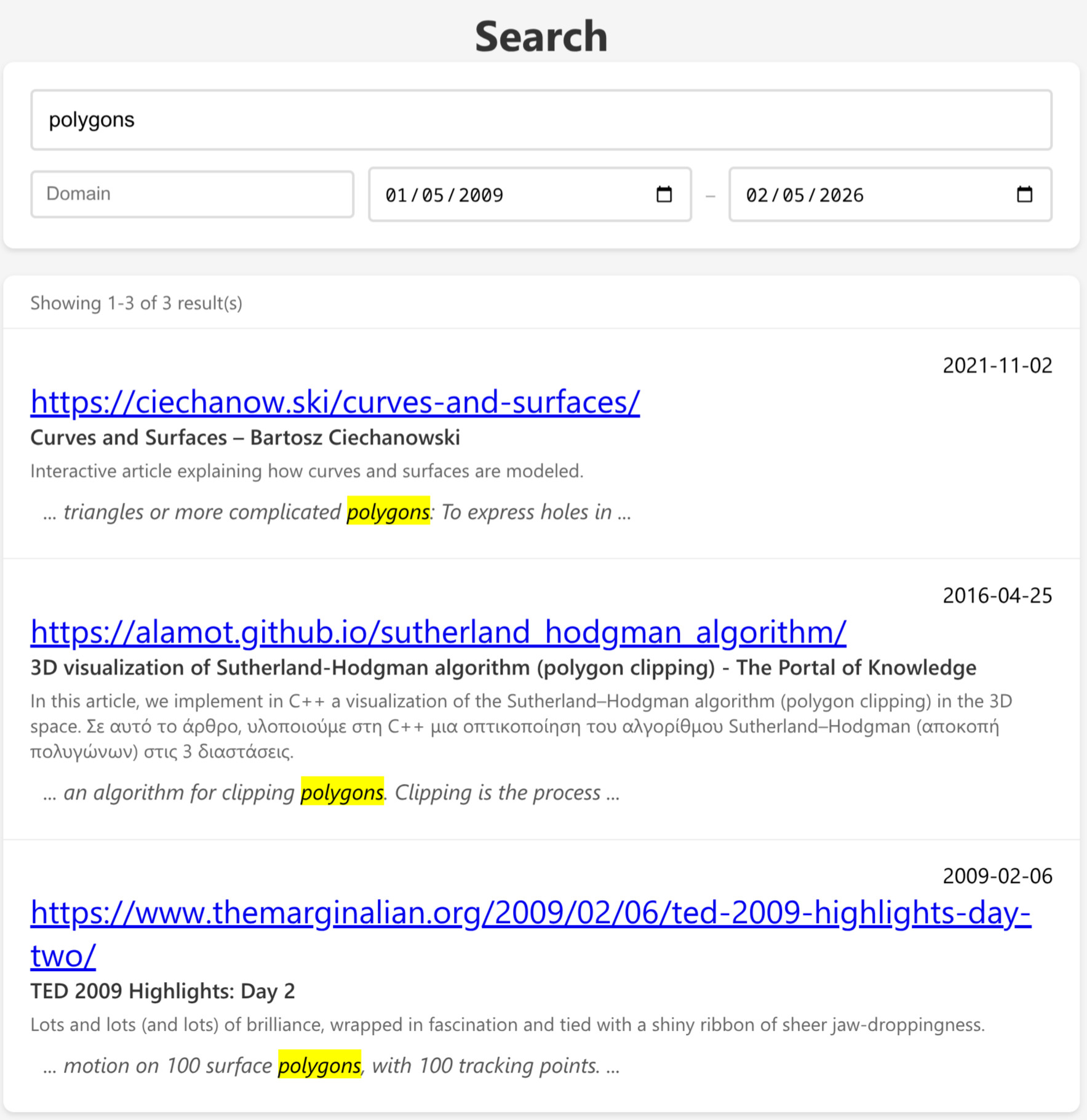
ScreenshotsΣτιγμιότυπα
Full codeΠλήρης κώδικας
You can download the full code from here: SearchEngine
Μπορείτε να κατεβάσετε τον πλήρη κώδικα απο εδώ: SearchEngine